
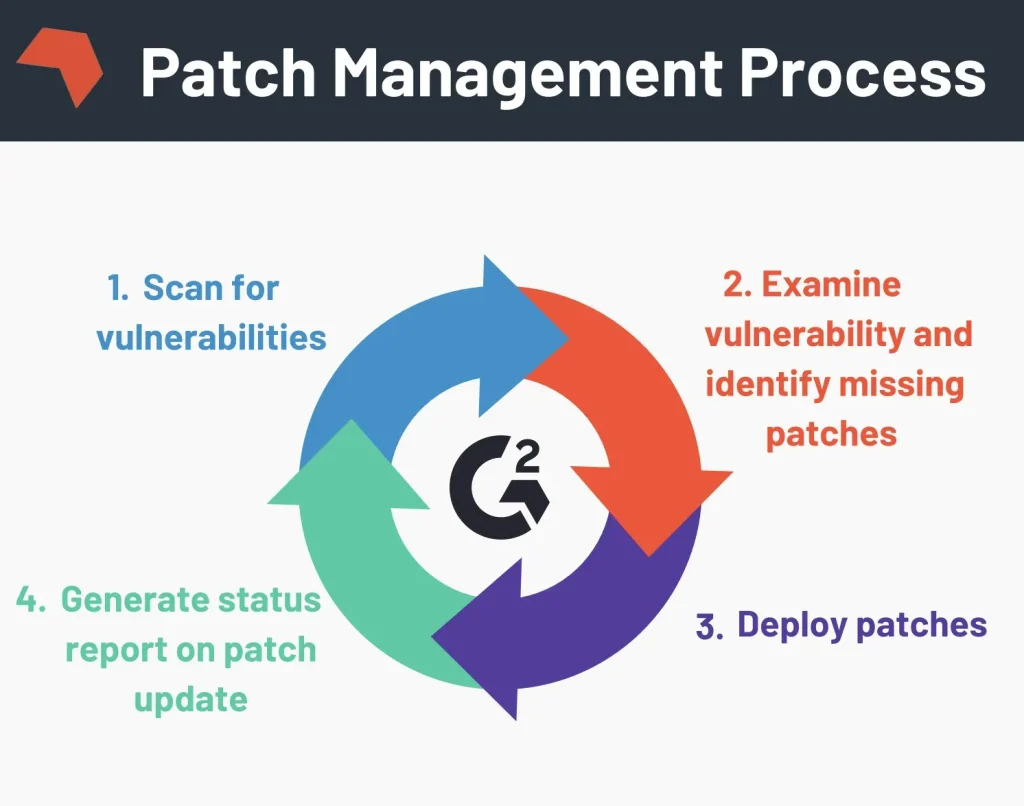
Patch management is more than routine maintenance; it is the frontline defense against cyber threats and system instability. This structured, repeatable process ensures critical fixes reach the right systems at the right time, reducing risk and uncertainty for IT operations. When implemented well, it reduces exposure to vulnerabilities, improves compliance posture, and minimizes downtime from bugs or compatibility issues. In an era where exploits can target unpatched endpoints within hours of disclosure, a robust management strategy for software updates and remediation is essential. Adopting best practices for updates, security patches, and vulnerability remediation as part of the overall governance and change process helps organizations stay secure.
Seen from another angle, this discipline aligns with update management across endpoints, servers, and the cloud, prioritizing timely security fixes. It describes a continuous patch lifecycle—identifying, testing, deploying, and validating changes—across diverse environments. Using terms like software updates, security patches, vulnerability remediation, and patch deployment helps teams connect the concept to related practices and standards.
Patch management Fundamentals: Understanding the Lifecycle of Software Updates
Patch management is the deliberate, repeatable process that identifies, acquires, tests, and deploys patches to software and operating systems. It acts as the frontline defense against threats by turning software updates into concrete risk reductions. When aligned with patch management best practices, this approach not only closes security gaps through security patches but also addresses bugs and compatibility improvements that affect reliability.
A robust patch management process starts with full visibility into every asset and application, followed by risk-based prioritization, testing in a staging environment, and controlled deployment. Governance and documentation turn patch activity into auditable evidence, while continuous verification ensures patches are applied and systems remain compliant. In this sense, patch management is as much about process discipline as it is about code updates that mitigate vulnerability remediation needs.
The Patch Management Lifecycle: From Inventory to Governance
Successful patch management unfolds across stages: inventory, assessment, testing, deployment, verification, and governance. Asset discovery and classification provide the foundation for knowing what needs patches, while assessment uses risk scoring, CVSS data, and business impact to drive prioritization. This is where software updates become a measured response rather than reactive firefighting.
Testing in representative environments catches regressions and compatibility issues before production. Deployment strategies—phased rollouts, maintenance windows, and change-management approvals—minimize disruption. Verification confirms patch success, and governance ensures policy compliance, metrics, and accountability throughout the patch management process.
Patch Management Across Environments: Windows, Linux, and Beyond
Cross-platform patch management requires a unified strategy that accommodates Windows, Linux, macOS, and mobile devices. Centralized tools like WSUS or Intune for Windows, and package managers such as apt or yum for Linux, help synchronize software updates with security patches across endpoints. A consolidated inventory supports vulnerability remediation by revealing where patches are still needed.
To support remote offices and offline networks, consider offline patch repositories or portable media with validated updates. Cross-environment consistency reduces risk from divergent patch cadences and dependency constraints, ensuring the patch management process remains reliable no matter the platform.
Integrating Patch Management with Vulnerability Management and ITSM
Connecting patch management with vulnerability management and ITSM creates a closed-loop remediation workflow. By tying patch deployment to vulnerability data, teams can prioritize the most exposed systems and demonstrate progress against patch management best practices. This integration strengthens evidence for compliance and accelerates vulnerability remediation cycles.
Operationally, integrated dashboards, audit trails, and change-control records provide traceability. ITSM workflows handle approvals, ticketing, and rollback plans, while security teams monitor exposure and adjust remediation priorities as new threats emerge. The result is a cohesive patch management process that aligns security and operations.
Automation and Tools: Accelerating Patch Management at Scale
Automation is the engine of modern patch management, accelerating discovery, scanning, testing, deployment, and rollback. Telemetry and analytics enable proactive patching, reducing the window of vulnerability and simplifying vulnerability remediation across large fleets. When automated, routine tasks become repeatable, consistent, and auditable.
Tool ecosystems—endpoint management suites, patch databases, and vulnerability management integrations—provide the runway for scalable patching. These tools harmonize Windows updates, Linux patches, and third-party application updates in a single console, helping organizations follow patch management best practices while maintaining compliance.
Measuring Success and Governance: KPIs, SLAs, and Compliance
Measuring success with meaningful KPIs is essential to justify investment and drive improvement. Metrics such as mean time to patch (MTTP), patch deployment rate, and the percentage of devices with current patches illuminate progress and vulnerability exposure over time. Service-level agreements (SLAs) and cycle length provide governance signals that guide prioritization and budgeting.
Well-defined governance, roles, and documented policies ensure accountability across IT, security, and operations. Regular audits, patch verification, and executive dashboards demonstrate ongoing compliance with regulatory requirements and internal standards. By treating patch management as a formal program, organizations can sustain vulnerability remediation and maintain business continuity.
Frequently Asked Questions
What is patch management and how does it support software updates and security patches?
Patch management is the structured lifecycle of identifying, acquiring, testing, and deploying patches across systems to keep software updates current and to close security patches. By focusing on vulnerability remediation and compliance, patch management reduces exposure to threats, minimizes downtime from fixes, and helps ensure endpoints stay protected and compliant.
What are the key steps in the patch management process from inventory to governance?
The patch management process typically includes inventory, assessment, testing, deployment, verification, and governance. This sequence ensures you know all assets, prioritize patches by risk, validate compatibility, deploy securely, confirm success, and document decisions for auditability and ongoing governance.
What are patch management best practices to improve security and compliance?
Best practices include building a comprehensive asset inventory, prioritizing patches by risk and business impact, standardizing testing, establishing a dependable deployment pipeline, validating installations, integrating with vulnerability management and ITSM, leveraging automation, defining governance and SLAs, and measuring outcomes with meaningful KPIs. These practices strengthen vulnerability remediation and regulatory compliance.
How can automation and patch management tools improve the patch management lifecycle and software updates?
Automation accelerates every phase of the patch management lifecycle—discovery, scanning for missing patches, deployment, and rollback. Patch management tools and endpoint management suites streamline these tasks, while integration with vulnerability data and ITSM enhances prioritization, auditing, and reporting for effective security patches and software updates.
Which KPIs should be tracked to measure patch management success and risk reduction?
Key KPIs include mean time to patch (MTTP), patch deployment success rate, the percentage of devices with current patches, patch cycle length, and residual vulnerability exposure. Tracking these metrics helps assess the patch management process, demonstrates progress in vulnerability remediation, and supports governance and continuous improvement.
How should organizations prepare for zero-day or out-of-band security patches within patch management?
Prepare for zero-day or urgent security patches by implementing an out-of-band patch process that accelerates testing and approvals, uses maintenance windows, and includes rollback plans. Strong governance and clear communication with security teams ensure rapid vulnerability remediation without compromising stability.
| Topic | Key Point (Summary) | Notes / Examples |
|---|---|---|
| Patch management — Definition and goals | Structured, repeatable process to ensure critical fixes reach the right systems at the right time; reduces vulnerabilities, improves compliance, and minimizes downtime. | Essential in modern environments where exploits can target unpatched endpoints within hours of disclosure. |
| Patch management lifecycle | Identify, acquire, test, and deploy patches across software and operating systems; patches include security, bug fixes, and occasional feature updates. | Requires visibility into assets, a clear prioritization framework, and reliable deployment mechanisms. |
| Key phases: Inventory | Accurate asset discovery and classification establish what to patch; prevents orphaned or vulnerable devices. | Continuous inventory helps map exposure and supports effective patching. |
| Key phases: Assessment | Prioritize patches by severity, exploit availability, and system criticality using risk scoring and CVSS data. | Focus on high-risk patches first to reduce potential impact. |
| Key phases: Testing | Use staging to catch regressions and verify compatibility with key business apps and performance. | Tests should cover business processes and integration points to mitigate issues. |
| Key phases: Deployment | Choose deployment strategies (all-at-once, phased, or blue-green) with maintenance windows and approvals to minimize disruption. | Coordinate with users and IT teams to reduce downtime and risk. |
| Key phases: Verification | Post-deployment checks verify success, integrity, and absence of new issues; automated validation and periodic scans confirm ongoing compliance. | Ensures devices remain at the desired patch level and healthy. |
| Key phases: Governance | Documentation, policy enforcement, and metrics align patching with security and compliance goals; establishes accountability. | Supports audits and continuous improvement across IT, security, and operations. |
| Why Patch Management matters | Security patches close exploitable gaps; delays raise breach and ransomware risk; supports regulatory compliance and better vulnerability metrics. | Improves mean time to patch (MTTP) and change-control outcomes. |
| Core best practices (overview) | A structured set of practices to drive effectiveness; see items 1–10 for details. | Asset inventory, risk-based prioritization, testing, deployment pipelines, post-deployment validation, integration with vulnerability management and ITSM, automation, governance, KPIs, and zero-day readiness. |
| Patching across environments | Windows (WSUS/Intune) and Linux (apt/yum) require different tooling; cross-platform coherence matters; offline repositories can help remote/offline devices. | Practices should accommodate platform-specific cadences and dependencies. |
| Automation | Automates discovery, scanning, testing, deployment, and rollback; telemetry enables proactive patching and reduced exposure. | Supports rapid responses and consistent outcomes across environments. |
| Tools and solutions | Endpoint management suites, patch repositories, vulnerability management integrations, and compliance-focused features. | Consolidates patching workflows and strengthens auditability. |
| Common challenges | Heterogeneous environments, legacy systems, bandwidth constraints, compatibility issues, and remote endpoints. | Mitigations include automation, phased deployments, caching, rollback plans, and VPN-aware deployment. |
| Security vs feature patches | Prioritize security patches for critical systems; evaluate feature patches for non-critical environments. | Policy should ensure security takes precedence without stalling necessary feature updates. |
| Governance, policy & compliance | Written policies, procedures, and sponsorship; align with frameworks; audits and dashboards demonstrate compliance and risk reduction. | Ensures ongoing alignment with regulatory requirements and executive oversight. |
| KPIs | MTTP, patch deployment success rate, assets missing critical patches, patch cycle length, and vulnerability exposure trends. | Guides improvements and demonstrates value to leadership. |
Summary
Patch management is a strategic function that integrates IT operations, security, and governance to protect an organization from evolving threats. By building a robust inventory, prioritizing patches based on risk, testing thoroughly, automating deployment, and measuring outcomes, organizations can achieve a resilient patch management program. The goal is to manage risk, improve compliance, and maintain business continuity without sacrificing productivity. Embracing patch management best practices for software updates, security patches, and vulnerability remediation lays the foundation for a safer, more reliable IT environment.