
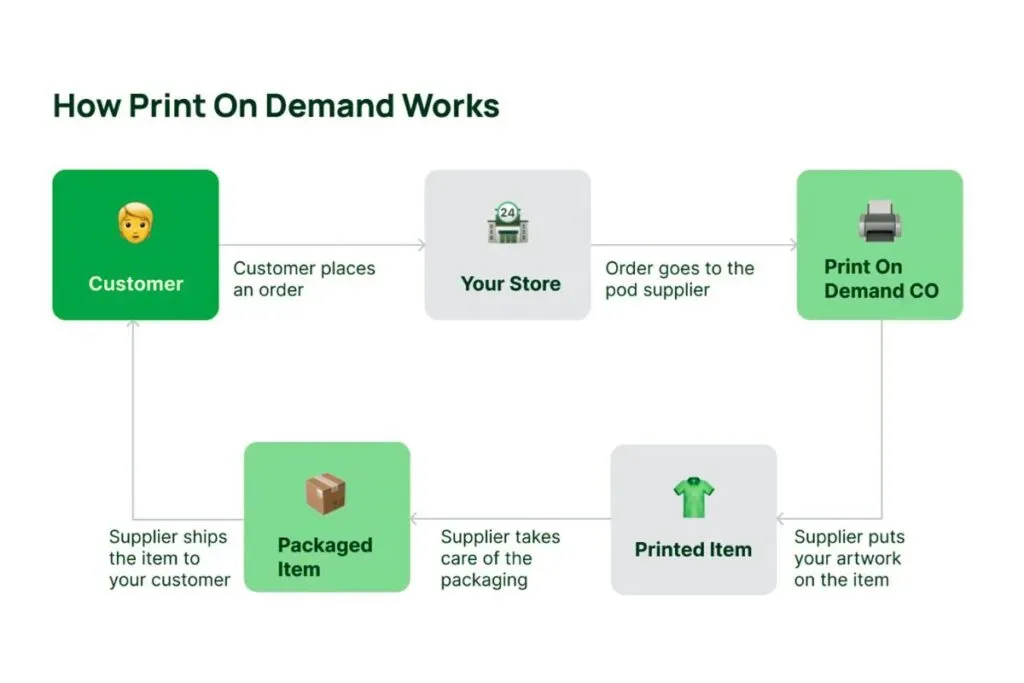
Print on Demand design best practices are essential for turning creative ideas into successful products in a crowded marketplace. In this guide, you’ll learn how fonts, colors, and POD mockups influence perception and conversion across popular POD platforms. We’ll cover print on demand fonts, POD color palettes, and print-on-demand typography, ensuring readability from tees to mugs and phone cases. A core principle is color management for print-on-demand, so colors remain harmonious whether viewed on screen or printed on fabric. By harmonizing typography, color, and imagery, you build cohesive branding that guides shoppers from first glance to final purchase.
Think of these guidelines as a framework for on-demand product design, focusing on scalable typography, coherent color strategy, and authentic presentation. Alternative terms in practice include POD design standards, print-on-demand asset systems, and brand-ready mockup workflows that translate ideas into merch-ready layouts. By aligning creative assets with production realities—from Pantone-compatible color values to legible typography on diverse surfaces—you ensure consistency across marketplaces. This approach helps teams collaborate more efficiently, reduce revision cycles, and deliver cohesive collections that resonate with customers.
Typography and Fonts for Print on Demand: Crafting Readable, Brand-Aligned Text
Fonts shape tone, readability, and information hierarchy across a wide range of POD products. When selecting print on demand fonts, prioritize typefaces that stay legible at varying sizes and on diverse surfaces—from T-shirts to mugs to phone cases. Start with a small, versatile family and pair it with a complementary sans or serif to create clear contrast, ensuring your message remains accessible regardless of product shape or print method.
Licensing is non-negotiable in POD typography. Verify commercial-use rights for the number of products you offer and factor in how tracking, leading, and weight behave on curved surfaces or textured fabrics. On surfaces with wrinkles or folds, adjust letter-spacing to preserve readability without sacrificing personality, and keep font families to two or three to maintain a cohesive brand voice.
POD Color Palettes and Color Management for Print on Demand
A well-crafted POD color palette serves as the emotional spine of your brand, translating across screens and fabrics. Build a core palette that aligns with your identity, then develop seasonal extensions to keep offerings fresh. Use color theory to guide contrast and harmony, prioritizing high readability on varied backgrounds and surfaces.
Color management for print-on-demand is the bridge between on-screen accuracy and printed output. Calibrate monitors, adopt standardized color spaces, and soft-proof where possible. Document hex values alongside Pantone or printer-friendly equivalents, and test colors across different substrates to anticipate shifts in hue and brightness during production.
POD Mockups that Convert: Realistic Presentations of Your Designs
Mockups connect design intent with the customer experience by showing how a design interacts with a product’s surface, lighting, and curvature. Use clean, high-quality product images and place your design in a way that feels natural, with consistent lighting across angles to reflect real-world wear and usage.
Context matters: demonstrate how a design appears on multiple variants—heather, black, white, or textured fabrics; or glossy vs. matte surfaces for mugs and packaging. Include multiple contexts to help customers imagine the product in their world, which can improve conversion rates while maintaining legibility and visual balance.
Print-on-Demand Typography: Balancing Style and Legibility Across Surfaces
Effective print-on-demand typography requires a thoughtful hierarchy that guides viewers from headlines to body text while accommodating surface challenges. Consider how fonts render on apparel, phone cases, and home goods, and choose type scales that stay readable on small screens and close-up previews alike.
Beyond aesthetics, licensing and technical adjustments matter. Confirm licenses cover the intended products, and fine-tune tracking, leading, and weight when exporting designs so lines stay clean on curved surfaces such as mugs or bottles. Pair your typographic choices with supporting color and layout to maintain legibility across formats.
Print on Demand design best practices for Scalable Catalogs
Print on Demand design best practices establish a repeatable system for typography, color, and mockups that scales with catalogs. Build a design framework that uses consistent font families, a core POD color palette, and a unified mockup style so new products slot into your brand seamlessly.
Document guidelines for surface-specific challenges, product templates, and export settings to ensure every item in the catalog aligns with your standards. A scalable approach reduces variability, lowers revisions, and helps partners reproduce your vision accurately across marketplaces and production runs.
Layout, Accessibility, and Final Prep: From Concept to Print-Ready Files
A clear layout and strong composition rely on a grid system that aligns typography, imagery, and negative space. Prioritize accessibility by ensuring sufficient color contrast for text on product backgrounds and using font sizes that read well on small screens and in close inspection.
Prepare print-ready files with proper bleed, safe margins, and approved color profiles. Maintain a shared library of fonts, color values, and mockups, and use repeatable export settings. Soft-proof against intended surfaces and perform spot checks on proofs to keep color management for print-on-demand precise and consistent across all products.
Frequently Asked Questions
How should I choose print on demand fonts for effective print-on-demand typography across multiple products?
Begin with two to three font families maximum. Choose a versatile primary font and a complementary sans or serif to create contrast. Ensure a commercial license covers the number of products you offer. Test readability on curved surfaces and through textures, and adjust tracking, leading, and weight to preserve legibility. Remember licensing and surface impact when using print on demand fonts.
What steps create strong POD color palettes and color management for print-on-demand to ensure consistent output?
Create a core POD color palette aligned with your brand, including a primary, secondary, neutral, and accent. Use color theory to guide contrast and harmony; test colors on different surfaces since inks alter hue. Calibrate your monitor and work in standard color spaces such as sRGB; soft proof when possible and adapt to CMYK or printer profiles if required. Document color values in hex and Pantone for production partners, and implement color management for print-on-demand to reduce surprises.
How can I design and use POD mockups to accurately present designs on different surfaces and boost conversions?
Use clean, high quality product images and overlay your design in a natural way. Ensure lighting is consistent and that textures, seams, or fabric folds are visible but not distracting. Prefer 3D or textured mockups for apparel, mugs, and packaging to replicate real world conditions. Show multiple contexts such as white, heather, and black fabrics or different desk settings. Make sure the design remains legible against varying backgrounds and include descriptive alt text for accessibility.
What role do layout, composition, and accessibility play in print-on-demand typography and overall POD design best practices?
Layout and composition should follow a grid to align typography, images, and negative space. A clear hierarchy guides the viewer from the main message to details. Accessibility matters; ensure color contrast for text, readable font sizes on small screens, and use descriptive alt text for all designs. This approach aligns with print-on-demand typography and general POD design best practices to improve readability and reach.
What are the essential file preparation and export steps for print-on-demand design best practices to ensure print-ready files?
Prepare print ready files with the correct resolution, color profiles, and bleed. Use 300 DPI for raster assets and keep vector elements scalable. Respect bleed and safe margins so nothing gets cut. Export formats should match printers or marketplaces, typically TIFF and PNG for transparency, high resolution JPEG for color, and vector exports like PDF for vectors. Maintain a shared library of fonts and document export settings, and soft proof against the intended print surfaces.
How can I build a repeatable POD design workflow that efficiently integrates print on demand fonts, POD color palettes, and POD mockups?
Start with a brand focused brief that includes your core keywords. Centralize fonts, color values, and mockup templates in a shared library accessible to multiple designers. Create product specific guidelines that document surface challenges and recommended settings. Build a set of test layouts to validate typography across surfaces and color shifts. Use a quick validation checklist before production that covers font licensing, color consistency, bleed, and export formats. This workflow integrates print on demand fonts, POD color palettes, and POD mockups to scale your catalog efficiently.
| Topic | Key Points | Notes / Guidance |
|---|---|---|
| Introduction | – POD design practices turn ideas into products – Visual impact of fonts, colors, and mockups matters – Aim for cohesive typography, color, imagery, and branding – Focus on converting browsers into buyers |
Sets the context: repeatable strategies for fonts, color, and mockups across POD platforms. |
| Fonts and Typography for POD | – Start with a small, versatile type family – Pair with a complementary sans or serif to create contrast – Limit font families to two or three for cohesion – Ensure commercial licenses; check usage rights – Consider legibility on curved surfaces; adjust tracking/leading/weight as needed |
Legibility across surfaces (shirts, mugs, phone cases) is critical; licensing rights must be verified. |
| Color Palettes and Color Management for POD | – Build a core brand palette plus seasonal palettes – Core: primary, secondary, neutral, accent – Use color theory: high contrast, complementary, analogous – Test colors across surfaces; inks/textiles affect hue – Calibrate monitors; use sRGB (or printer-specific profiles); soft proof when possible – Document hex and Pantone values for consistency |
Plan for screen-to-print differences and keep references for production partners. |
| Mockups that Convert for POD | – Use realistic, uncluttered scenes; show scale and intent – Start with clean product images; overlay design naturally – Maintain consistent lighting across angles; reveal textures subtly – Use 3D or textured mockups when possible – Show multiple contexts (light/dark fabrics, different surfaces) – Ensure legibility against backgrounds; avoid busy areas; maintain consistent typography/color |
Contextual usage and accessibility improve conversion and clarity. |
| Layout, Composition, and Accessibility | – Use a grid to align typography, images, and negative space – Establish a clear emphasis hierarchy for messaging – Ensure sufficient color contrast for accessibility – Use descriptive alt text for mockups to aid SEO and accessibility |
Design remains legible across formats; accessibility and SEO are integrated from the start. |
| File Preparation and Export for POD | – Aim for 300 DPI raster assets; vectors stay scalable – Respect bleed and safe margins – Use printer-friendly formats: TIFF, PNG (transparency), high-res JPEG; vector: PDF – Align exports with printer/market requirements; document export settings – Soft-proof and spot-check colors on proofs |
A consistent, production-ready workflow reduces surprises in printing. |
| Packaging and Product Variation Considerations | – Account for multiple product types (apparel, cases, home goods) – Create product-specific templates with consistent typography/color style – Preserve core theme to keep brand cohesion across products |
Design systems support variation while maintaining brand integrity. |
| Practical Tips for a Repeatable POD Design Workflow | – Use a brand-focused brief including the focus keyword Print on Demand design best practices – Centralize fonts, color values, and mockups – Document product-specific guidelines and test layouts – Run a quick validation checklist before production – Verify fonts, color consistency, bleed, and export formats |
A repeatable workflow enhances efficiency and reduces errors in large catalogs. |
| Common Pitfalls to Avoid | – Inconsistent typography across products – Underestimating screen-to-print color shifts – Ignoring font licensing and usage rights – Overly complex mockups that distract from design – Missing bleed and safe margins in exports |
Awareness of common issues helps preserve brand quality and production readiness. |
Summary
Conclusion: Print on Demand design best practices guide how to create visuals that perform across both digital screens and printed items. By applying thoughtful typography, robust color management, and realistic mockups, designers can build repeatable workflows that scale across product variations while maintaining accessibility and brand integrity. Licensing compliance, clear file preparation, and consistent presentation across surfaces are essential for reducing surprises and returns. Emphasizing these practices helps convert browsers into buyers and strengthens brand perception in the POD marketplace.